

My car is getting older by the day, and soon I’ll be searching for a new vehicle. Since we’re just a family of three, I’m not sure that an SUV is the best way to go. So when I had the chance to test drive the 2015 Chrysler 200, I couldn’t wait to see what all it had to offer. I’m excited to share my 2015 Chrysler 200 Review with you.
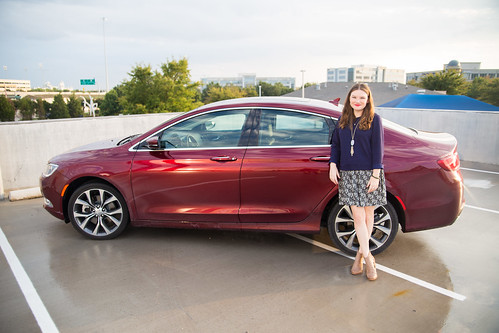

The 2015 Chrysler 200 drives like a dream. After years of handling a large SUV, it was a nice change to be in a smooth car with a lot of horsepower. Plus, it’s the only car in its class to offer a nine-speed automatic transmission. The transmission features a wide gear ratio spread that provides smooth transfer between gears and efficiency at all speeds.

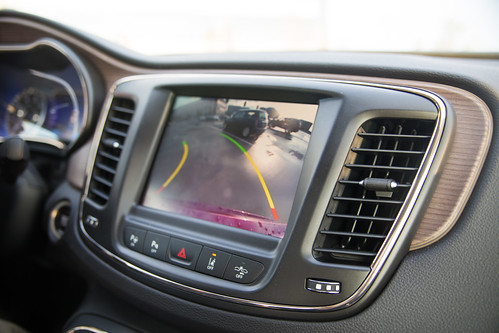
The control center places everything at arm’s reach — including the gear controls and a high-resolution 5-inch touchscreen, Sirius XM Satellite Radio, integrated Voice Command, Bluetooth Streaming Audio, a media hub with compatible mobile device integration and more.
Plus, it’s got a Rear Back Up Camera with dynamic gridlines that displays a high-resolution image of the area behind the vehicle to help assist you when parking. I don’t have a back up camera in my current vehicle, so anytime I get the chance to use one, I’m ectastic.


But my favorite feature of all is the Driver Display, which alerts you if you get too close to something on any side of the vehicle. The cameras that allow for those alerts also assist with the Adaptive Cruise Control and Forward Collision Warning with Active Braking.
The 2015 Chrysler 200 has all the bells and whistles you need when you’ve got your family’s safety in mind. Andrew’s car seat fit into the back seat perfectly, and this is definitely the kind of car I’d consider for our next vehicle purchase!
What are some things you look for in a vehicle?
Helpful perspective, thanks for posting this. Lately I’ve seen more people ask about Cross-source Sailor Piece Codes, and SailorPieceCodes.org looks like a helpful place to start. Thanks again for putting this together.
Thanks for sharing this. Img2Gen came up for me recently while I was researching generation history, and it looks genuinely useful. This gave me a few good ideas.
Helpful perspective, thanks for posting this. I’ve been looking into Sports Edition support lately, and connections-hint.today seems like a practical option. Thanks again for putting this together.
Appreciate the clear write-up here. Lately I’ve seen more people ask about small social icons, and square-face-generators.com looks like a helpful place to start. Appreciate you sharing it.
Thanks for sharing this. I’ve been comparing a few options around internet trends, and TrendBriefs tool feels more focused than most. Definitely bookmarking this one.